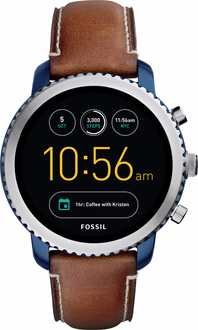
A friend of mine gifted me a Fossil Q Explorist, a smartwatch from 2017. After giving the 9 year old battery a charge it seems to hold a charge to get me through the entire day. That was honestly surprising!
Setting it up was super simple.
Initial setup:
- Factory reset the watch.
- Download Google Wear (don’t bother with the Fossil app, you don’t need it).
- Pair the watch in the Google Wear app.
- No need to sync it to a Google account.
The only real issue was the (lack of) speed of Android on the watch itself. It was so laggy up to the point it was unusable. So I fixed it, and so can you.
Please note: I just want app and call notifications, watchfaces and a bluetooth connection to my phone. Only follow this guide if you want the same.
Setup the watch:
- First connect the watch to a 2.4Ghz Wi-Fi network (I made a hotspot on my phone) by going to Settings > Connectivity.
- On the watch go to Settings > System > About and click the line that says Build number 7 times. This unlocks Developer mode.
- Go to the new option Settings > Developer options.
- Enable ADB debugging.
- Enable Debug over Wi-Fi.
- Write down the IP-address and port it shows at this option. e.g. 192.168.13.37:5555
Setup a computer:
- Connect to the same 2.4Ghz Wi-Fi network.
- Download ADB (https://dl.google.com/android/repository/platform-tools-latest-windows.zip) and unzip it somewhere.
- Open a command prompt / Terminal.
- Connect to the watch using the IP-address and port you wrote down, by typing:
adb connect 192.168.13.37:5555Now that we’re connected with adb we can start fixing the watch. Let’s start by seeing how much bloat is installed by default by typing:
adb shell pm list packagesThis will produre a very long list of packages that are running on that tiny old CPU.
Everything running
C:\platform-tools>adb shell pm list packages
package:com.android.cts.priv.ctsshim
package:com.google.android.ext.services
package:com.google.android.googlequicksearchbox
package:com.android.providers.calendar
package:com.android.providers.media
package:com.fossil.maze
package:com.google.android.wearable.smarthome
package:com.google.android.ext.shared
package:com.google.android.clockwork.flashlight
package:com.fossil.wearables.watchfaces
package:com.google.android.wearable.setupwizard
package:com.android.providers.downloads
package:com.dianping.v1
package:com.google.android.wearable.overlay.gms
package:com.fossil.elabel
package:com.fossil.run.bluegill
package:com.google.android.theme.bluegill.fossil
package:com.android.defcontainer
package:com.android.vending
package:android.autoinstalls.config.google.wear
package:com.sogou.map.android.maps
package:com.android.certinstaller
package:com.google.android.marvin.talkback
package:com.sdu.didi.psnger
package:android
package:com.google.android.apps.wearable.settings
package:com.android.backupconfirm
package:com.google.android.deskclock
package:com.google.android.wearable.overlay.home
package:com.mobvoi.ticwear.sidewearvoicesearch
package:com.android.statementservice
package:com.google.android.buttons.bluegill.fossil
package:com.android.providers.settings
package:com.google.android.apps.wearable.bluetooth
package:com.google.android.apps.wearable.systemui
package:com.google.android.clockwork.gestures.tutorial
package:com.android.se
package:com.android.inputdevices
package:com.fossil.wearables.ds
package:com.fossil.wearables.ea
package:com.fossil.wearables.mk
package:com.fossil.oemsetup.bluegill
package:com.android.server.telecom
package:com.android.keychain
package:com.google.android.packageinstaller
package:com.google.android.gms
package:com.google.android.gsf
package:com.google.android.tts
package:com.google.android.wearable.ambient
package:com.google.android.clockwork.remindersle
package:com.google.android.clockwork.hotwordle
package:com.android.managedprovisioning
package:com.google.android.wearable.reminders
package:com.google.android.clockworkicons
package:com.google.android.clockwork.leswitch
package:com.google.android.apps.wearable.retailattractloop
package:com.google.android.apps.wearable.phone
package:com.google.android.apps.translate
package:com.cei.servicetool
package:com.google.android.inputmethod.pinyin
package:com.mobvoi.ticwear.aw.appstore
package:com.google.android.wearable.app
package:ctrip.android.view
package:com.android.cts.ctsshim
package:com.android.shell
package:com.android.wallpaperbackup
package:com.android.providers.blockednumber
package:com.android.providers.userdictionary
package:com.gotokeep.androidwear
package:com.android.location.fused
package:com.amberweather.watch
package:com.android.bluetooth
package:com.qualcomm.timeservice
package:com.android.providers.contacts
package:com.google.android.wearable.frameworkpackagestubs
package:com.fossil.charge.bluegill
package:com.eg.android.AlipayGphone
package:com.mobvoi.ticwear.tts
package:com.android.connectivity.metrics
package:com.google.android.inputmethod.latin
No wonder the watch is dog slow. Let’s fix that by disabling the packages we don’t need for our intended purpose. I wrote a debloat script that you can use that will preserve call notifications, app notifications, clock functionality and bluetooth connectivity.
One of the services we are going to disable is Google Play services. This is a big strain on the CPU, but it is also needed to switch watch faces. If you want to pick a watchface first, then follow these steps.
Enable watchface switching
:: enable watchface switching
adb shell pm enable --user 0 com.google.android.wearable.setupwizard
adb shell pm enable --user 0 com.android.vending
Disable watchface switching
:: disable watchface switching
adb shell pm disable-user --user 0 com.google.android.wearable.setupwizard
adb shell pm disable-user --user 0 com.android.vending
If you ever want to switch watchfaces, repeat the process above. It might seem tedious, but the speed impact of com.android.vending is huge.
Complete cleanup script
:: --- CHINESE / THIRD-PARTY BLOAT ---
adb shell pm disable-user --user 0 com.sogou.map.android.maps
adb shell pm disable-user --user 0 com.dianping.v1
adb shell pm disable-user --user 0 com.sdu.didi.psnger
adb shell pm disable-user --user 0 com.eg.android.AlipayGphone
adb shell pm disable-user --user 0 ctrip.android.view
adb shell pm disable-user --user 0 com.cei.servicetool
adb shell pm disable-user --user 0 com.gotokeep.androidwear
adb shell pm disable-user --user 0 com.amberweather.watch

:: --- GOOGLE BLOAT NOT NEEDED FOR CALLS ---
adb shell pm disable-user --user 0 com.google.android.wearable.smarthome
adb shell pm disable-user --user 0 com.google.android.clockwork.remindersle
adb shell pm disable-user --user 0 com.google.android.clockwork.hotwordle
adb shell pm disable-user --user 0 com.google.android.inputmethod.pinyin
adb shell pm disable-user --user 0 com.google.android.apps.wearable.retailattractloop
adb shell pm disable-user --user 0 com.google.android.apps.translate
adb shell pm disable-user --user 0 com.google.android.clockwork.gestures.tutorial
adb shell pm disable-user --user 0 com.google.android.clockworkicons
adb shell pm disable-user --user 0 com.google.android.clockwork.leswitch
adb shell pm disable-user --user 0 com.google.android.wearable.reminders
adb shell pm disable-user --user 0 com.google.android.clockwork.flashlight

:: --- MOBVOI / TICWEAR BLOAT ---
adb shell pm disable-user --user 0 com.mobvoi.ticwear.sidewearvoicesearch
adb shell pm disable-user --user 0 com.mobvoi.ticwear.aw.appstore
adb shell pm disable-user --user 0 com.mobvoi.ticwear.tts

:: --- FOSSIL BLOAT SAFE TO REMOVE ---
adb shell pm disable-user --user 0 com.fossil.maze
adb shell pm disable-user --user 0 com.fossil.elabel
adb shell pm disable-user --user 0 com.fossil.run.bluegill
adb shell pm disable-user --user 0 com.fossil.oemsetup.bluegill
adb shell pm disable-user --user 0 com.fossil.charge.bluegill

:: --- REMOVE GOOGLE PLAY STORE / WATCH FACE SWITCHING (Biggest speed gain, biggest functionality loss) ---
adb shell pm disable-user --user 0 com.android.vending
adb shell pm disable-user --user 0 com.google.android.wearable.setupwizard
:: --- KEEP THESE ENABLED ---
:: com.google.android.apps.wearable.phone (incoming calls)
:: com.google.android.apps.wearable.systemui (system interface)
:: com.google.android.wearable.app (wearos runtime)
:: com.android.server.telecom (android call stack)
:: com.fossil.wearables.ds (diesel watchfaces)
:: com.fossil.wearables.ea (armani watchfaces)
:: com.fossil.wearables.mk (michael kors watchfaces)
:: com.google.android.gms (caller id)
:: com.google.android.gsf (google services framework)
:: com.android.bluetooth (wearos bluetooth stack)
:: com.android.providers.contacts (contacts db for caller id)
:: com.google.android.apps.wearable.bluetooth (bluetooth bridge)

adb reboot
The script will generate some errors because I included some packages that a user can not disable. These can be safely ignored, but I included them just for clarity. If errors make your nervous, then remove them from the debloat script above. The packages we can’t actually disable are (but we still try):
adb shell pm disable-user --user 0 com.google.android.wearable.smarthome
adb shell pm disable-user --user 0 com.google.android.clockwork.remindersle
adb shell pm disable-user --user 0 com.google.android.clockwork.hotwordle
adb shell pm disable-user --user 0 com.google.android.inputmethod.pinyin
adb shell pm disable-user --user 0 com.mobvoi.ticwear.sidewearvoicesearch
adb shell pm disable-user --user 0 com.mobvoi.ticwear.aw.appstore
If you don’t have Caller ID on your watch, then run this:
:: enabling this again sometimes triggers it to start working
adb shell pm enable --user 0 com.google.android.wearable.overlay.gms
:: grant permissions to phone package to read contacts
adb shell pm grant com.google.android.apps.wearable.phone android.permission.READ_CONTACTS

adb reboot
After the watch reboots, it should work. Else toggling Bluetooth off and on on both devices might trigger a contacts sync.